I made this widget at MyFlashFetish.com.

Sunday, February 27, 2011

KOMPONEN YANG PATUT ADA PADA LAPTOP.

Pada permulaan laptop diperkenalkan, harganya sangat tinggi dan kebanyakan pengguna tidak dapat menikmati teknologi ini. Tapi kini, penggunaan laptop menjadi kegilaan ramai terutamanya pada generasi muda mudi kerana ia menjadi trend dan kerana harganya yang semakin murah. 

Kepelbagaian design dan aksesori yang terdapat pada sesebuah laptop menjadikan ia sebagai alat elektronik yang mendapat permintaan tinggi di pasaran kini.

Apa faktor yang mempengaruhi pilihan kepada sesebuah laptop/ notebook? Antara faktor yang dilihat ialah kualiti, komponen, ukuran, software dan aplikasinya. Seringkali kita tertanya-tanya apakah yang perlu dinilai sebelum membeli sesebuah laptop. 

Adakah memiliki laptop hanya untuk membuka facebook, melihat e-mail dan mendengar lagu-lagu kesukaan sahaja?. Jika inilah kegunaan laptop, kenapa perlu ada komponen video card tercepat, kapasiti yang lebih besar, dan sistem memori yang lebih baik.

Berikut  adalah komponen yang wajib diperhatikan sebelum membeli sesebuah laptop. Berdasarkan maklumat ini akan lebih memberi kefahaman kepada kita tentang komponen2 yang terdapat dalam laptop.


1. Processor

Ia adalah komponen penting dalam laptop. Ia diukur dalam unit GHz. Angka GHz mengukur sejauh mana kecepatan processor beroperasi dalam masa satu saat. Jumlah Core dalam processor juga sangat penting seperti Intel. Intel adalah processor yang terbaik diikuti oleh AMD. Processor seperti Core 2 dan Extreme adalah yang baik dalam kualiti performance diikuti AMD Turion 64 x2.


2. Memori
Sesebuah laptop akan mempunyai kapasiti memory yang berbeza-beza. Misalnya apabila menggunakan OS Window Vista ia memerlukan memory minima sebanyak 512 MB. Jika memori yang dimiliki kurang, maka harddisk akan digunakan sebagai memori. Ini akan melambatkan performace laptop. Jadi, lebih besar memori adalah lebih baik dan memori laptop boleh ditambah kemudian hari apabila diperlukan.


3. Harddisk

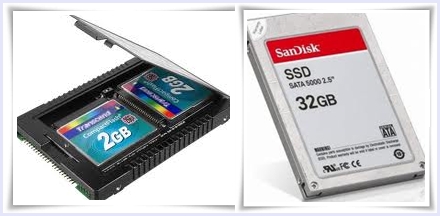
Media penyimpan yang terkenal masa kini ialah SSD ( Solid State Drive) dan harddisk. SSD lebih baik dari segi performance kerana lebih cepat. Kerana harganya yang mahal laptop masa kini lebih menggunakan harddisk.


4. Video Card

2 jenis iaitu:-
  • Integrated: Menggunakan RAM
  • Dedicated: Menggunakan memori sendiri. Jenis ini lebih baik dan sesuai untuk pengguna yang gemar games.


5. Pilihan Laptop Berdasarkan Ukuran Layar.

Ini kerana ia mempengaruhi harga sesebuah laptop/ notebook.

  • Desktop Replacement:


Ukuran layar : 14 dan 15 inci
Pengguna: sesuai untuk kebanyakan pengguna seperti ahli perniagaan, pelajar, gamers
Harga: tidak tetap dan beragam mengikut jenis

  • Ultraportable: 


Ukuran layar: 11-13 inci
Pengguna: dirokemenkan kepada ahli perniagaan dan yang sering melakukan perjalanan
Harga: lebih mahal dari desktop replacement kerana lebih ringan dan senang dibawa kemana-mana

  • Netbook:


Ukuran layar: 7-10 inci
Menggunakan processor Intel Atom dan sesuai untuk tujuan browsing, chatting, dan kerja sederhana. Hardware seperti drive optic tidak ada dan miliki touchpad yang kecil.

  • Gaming: 


Ukuran layar: 16 inci ke atas
Ukuran layar yang besar supaya semasa bermain games, skrin lebih jelas dan lebih selesa digunakan.

Saturday, February 19, 2011

ROBOT MASA DEPAN: ADAKAH BAKAL MENGGANTIKAN MANUSIA?

Dalam Chapter 4, kita ada mempelajari tentang Artificial Intelligence(AI) yang mana AI ini digunakan untuk membangunkan sistem komputer yang mempunyai human sense. Sistem ini terdiri daripada Virtual Reality,Knowledge-based(Expert System) dan Robotics.Saban hari kehidupan kita semakin berkembang moden dan  canggih. Dunia teknologi berkembang dengan cepat dan tidak mampu untuk kita mengikutinya. 

Teknologi yg ditawarkan di pasaran amatlah banyak dan mempunyai pelbagai fungsi yang dapat memudahkan lagi kehidupan harian kita. Teknologi yang semakin berkembang sekarang adalah teknologi Robotik.Di luar negara contohnya di Jepun,sudah ada yg menggunakan robot untuk menggantikan peranan manusia. Teknologi robot amatlah canggih dan dapat membuat kerja yg kita inginkan sepenuh masa kerana robot tidak memerlukan rehat seperti manusia. ini dapat menjimatkan kos dan memdatangkan faedah yg tinggi. Akan tetapi bolehkah robot menggantikan manusia sepenuhnya? ini tidak mungkin kerana jika manusia digantikan dgn robot akan berlakulah pelbagai masalah contohnya pengangguran, tahap kesihatan manusia yg akan semakin jatuh kerana banyak peranan kerja yg diambil alih oleh robot. Adakah kita rela robot menggantikan manusia??kita tidak dapat menjangka bagaimanakah corak kehidupan di masa depan yang semakin hari semakin canggih. Cuba anda perhatikan gambar2 robot di bawah ini, banyak robot telah dicipta untuk melakukan pekerjaan yang biasanya dilakukan oleh manusia..............


Robot ini dicipta untuk menggantikan manusia dalam perlawanan sukan. adakah mungkin akan wujud sukan2 negara yang diwakili oleh robot??


Monday, February 14, 2011

CHAPTER 4: SPECIALIZED APPLICATION SOFTWARE

THE TOP 5 IMAGES EDITING APPLICATIONS CURRENTLY OUT IN THE MARKET

check it out...

1)  Photoshop
Not surprisingly, Photoshop is the winner by a landslide, garnering over half of all the total votes. Photoshop is what comes to mind when image editing is involved there’s very little that can be said about it that hasn’t been said already.
With an insurmountable amount of features that help you manipulate and enhance photos as well as create web graphics, all while helping you manage your workflow and image editing environment – Photoshop comes in at numero uno as the best image editing software currently in the market.


2)  GIMP
GIMP – which stands for the GNU Image Manipulation Program – is a feature-packed and powerful open source image editor that can be used in all major operating systems (Linux, Mac, and Windows). It has a customizable interface so that you can easily set the view and behavior of GIMP.
It has a huge set of retouching tools that will allow you to perform advanced image retouching and manipulation. The GIMP outputs your work in many common formats like JPG, GIF, PNG, TIFF, and even PSD (Photoshop’s native file format).
 
3)  Fireworks
Fireworks is Adobe’s image editing software for the web designers. It excels in several areas over its big brother Photoshop, namely in high-fidelity prototyping of sites and a workspace environment that’s optimized for web designers. It is also a raster and vector hybrid, being able to work with raster-based images and vector-based graphics better and more symbiotically than Photoshop.
Fireworks is a popular tool of choice for many web designers and was once voted as one of the top tools for web designers.
 

4) Inkscape


Inkscape is an open source vector graphics editor much like Adobe Illustrator, CorelDraw, and Xara X. Its default file format is web standards compliant Scalable Vector Graphics (SVG) under W3C’s specifications. Want to learn more about what Inkscape has to offer? Check out this list of articles and presentations about Inkscape.

  1. Pixelmator is a fast and powerful image editing software for the Mac operating system. With its intuitive and beautiful Graphical User Interface (GUI), support for layers to organize your document, a large assortment of painting tools, and simple-to-use photo correction tools. Pixelmator is an excellent pick for Mac users who don’t quite need the features (and price tag) of Photoshop.   


2011 BEST AUDIO EDITING SOFTWARE

1) Magix music maker

With this application, users can arrange, edit, build and mix tracks with intuitive, easy-to-use tools that provide a precise, professional audio editing experience. With an expansive set of resources, including built-in help resources, tutorials and online knowledge bases and forums, users receive detailed instruction and tutorial to guide them from the initial import to the eventual export. The set of tools, features and applications makes embellishing, editing and even creating new tracks from scratch an enjoyable experience that is built to accompany to users familiar with audio editing and production software and those trying it for the first time.


2) WavePad

WavePad Sound Editor receives great marks, maintaining simplicity of use without sacrificing its potential for editing, modifying and ultimately, transforming tracks into rich and complex songs. For these reasons and more, this sound editor is among the best audio editing software


3) Dexter Audio Editor

Dexster Audio Editor software, from Softdiv Software, may not offer as many editing tools as Magix Music Maker, but it makes up for it in ease of use. Anyone can use this product to pull audio from video files, convert formats, record from the internet, add effects, filter or burn CDs.


4) GoldWave Digital Audio Editor

GoldWave is a great audio editing software package. With an easy to use interface and quick results, this is a great choice for people interested in basic audio editing. It did not rank better because the graphics were not as impressive as the top-rated and it lacked a few key features.


5) Blaze Media Pro

Blaze Media Pro is a multimedia product that can just as easily function as a video editing and media management program as it can anaudio editing software program. The program alone has its fair share of merits,  but with its additional video and multimedia abilities, many of the missing audio editing features are made up for.


Video editing software, also known as Non Linear Editing (NLE), is application software which handles the editing of video sequences on a computer. NLE systems replace traditional flatbed celluloid film editing tools and analogue video tape-to-tape machines.
NLE software is typically based on a timeline interface paradigm where sections of moving image video recordings, known as clips, are laid out in sequence and played back. The NLE offers a range of tools for trimming, splicing, cutting and arranging clips across the timeline. 
As digital NLE systems have advanced their toolset their role has expanded and most consumer and professional NLE systems alike now include a host of features for colour manipulation, titling and visual effects, as well as tools for editing and mixing audio in conjunction with the image

Once a project is complete the NLE system can then be used to export to movie in a variety of formats in context which may range from broadcast TAPE formats to compressed formats for the internet, DVD and mobile devices.


2011 5 BEST VIDEO EDITING SOFTWARE


1) Cyberlink PowerDirector
CyberLink PowerDirector 9 is unsurpassed among video editing software applications. It is distinguished from other products by its superior processing speed, which it attains by fully exploiting the hardware capabilities of contemporary computers. It is largely for that reason that CyberLink PowerDirector has received theTopTenREVIEWS Gold Award for video editing software.


2) Corel VideoStudio Pro X3
Corel implemented a number of improvements and additions to the newest version of Corel VideoStudio Pro X3.  They sat down with a cross-section of users of the previous version and came up with a list of changes that had the user in mind.  The result is a faster product with a lot of new features you're going to come to know and love.


3) Adobe Premiere Elements
Adobe Premiere Elements 9 video editing software has numerous improved options to enhance your ability to make sophisticated videos. Upgraded functionality allows you to fix imperfections in the audio track as well as the video. Many automated features are available so that the program can be easily used by newcomers to the world of video editing software, but they can be overridden and enhanced to satisfy the creativity requirements of more advanced users.


4) MAGIX Movie Edit Pro
MAGIX Movie Edit Pro 17 Plus provides full editing capabilities for 2D video as well. High-definition video is fully supported, and the program’s new AVCHD import assistant makes importing and editing files easier than was previously possible. The assistance includes a preview monitor that simplifies scene selection and can save a lot of time.


5) VideoPad
Learning to use VideoPad requires very little effort. Indeed, it’s intuitive enough that we were performing some basic functions before even taking a look at the user manual. Drag and drop technology is at the heart of the simplicity. All of the most fundamental processes, including moving clips from the media list to the video and audio tracks or rearranging split clips, can be accomplished in this manner.


Evolution Robotics Now Accepting Pre-Orders for Mint

Since receiving an award at CES 2010, the Evolution Mint Floor Cleaner slipped into obscurity. Now, those who were impressed with it then can start taking the first step in acquiring this new floor general. 

During CES (Consumer Electronics Show) 2010 Last January, editors from Popular Mechanics picked the Evolution Mint among the thousands of products on display in awarding Popular Mechanics' Editor's Choice award for best new product. 

The  Evolution Mint is similar to the iRobot Scooba, sister product of the highly successful Roomba. While the iRobot Roomba is classified as a robotic vacuum cleaner, both the Scooba and the Mint clean floors similar to floor mops. That is, they make use of cleaning fluids. In the case of the Mint, the fluid is applied through Proctor and Gamble's revolutionary cleaning wipe, the Swiffer.

                                           Mint Floor Cleaner

                                            Mint Scooba


Tuesday, February 8, 2011

Microsoft Office 2010

With Microsoft office 2010, you can run your own business much easier. There is several type of this Microsoft. Take a look for more information…

 Microsoft Office 2010

Run your business your way with Office 2010
  • Get the tools to work quickly, easily, and intuitively—whether on the road or in the office, and whether working solo or as part of a team. 
  • Take advantage of popular programs including Microsoft Excel 2010, Outlook 2010 with Business Contact Manager, PowerPoint 2010, Publisher 2010, Word 2010, OneNote 2010, and Office Web Apps.


Featured Benefits:
  1. Staying connected to your customers and managing communication is fundamental.
  2. Looking professional and making informed decisions can be a precursor to success. 
  3. Managing your business while you’re out of the office is getting easier.

Microsoft Office Home and Business 2010

Be at home in the office
  • for managing small businesses and working from home.
  • Enhanced tools and features help you run your business, connect with customers, and organize your household more efficiently. 
  • The features are: 

Microsoft Word 2010
Microsoft Outlook 201
Microsoft One Note 201
Microsoft Power Point 201
Microsoft Excel 2010

Features Benefits:
  1. Express yourself with professional-quality documents.
  2. Work with and share the right information to assist decision making.
  3. Communicate your message visually.

Microsoft Office 2010 Professional

Software and support in one package

  •  get a wide range of powerful new ways to do their best work from more places – whether they’re using a PC, smartphone or web browser
  • From insightful updates to Excel, PowerPoint, Word and Outlook, to new server integration capabilities that make it easier for everyone to track, report and share vital information, Office Professional 2010 offers the complete package through familiar, intuitive tools.

Features Benefits:
  1.  Keeping in touch with your associates, customers, and prospects is critical to your business.
  2. Dynamic marketing materials are essential to helping your business stand out in the market.
  3. When your business collects lots of data, you need to be able to quickly and easily turn that data into actionable information.

Microsoft Office Standard 2010

Your Office, wherever you are.
  • gives you powerful ways to do your best work from more places using your PC, phone or web browser. 
  • With insightful updates for Microsoft Excel, Microsoft PowerPoint and Microsoft Word, as well as a commanding view of your world in Microsoft Outlook, you’ll stay productive and connected with familiar and intuitive tools. 


Microsoft Office Professional Plus 2010

Everything..Easier.
  • offers you user-driven updates and new server integration capabilities that make it easier for everyone to track, report, and share vital information. It’s the familiar, intuitive tools you trust all in one. 
  • the features are: 

  1.  Microsoft Word 2010
  2. Microsoft OneNote 2010
  3. Microsoft InfoPath 2010
  4. Microsoft PowerPoint 2010
  5. Microsoft Access 2010
  6. Microsoft SharePoint Workspace 2010
  7. Microsoft Outlook 2010 with Business Contact Manager
  8. Microsoft Publisher 2010
  9. Microsoft Communicator
  10. Microsoft Excel

Microsoft Office 2003 vs. Office 2007

Microsoft office 2003 and Microsoft Office 2007 are two sets of desktop applications and servers as an office suite which are introduced one after the other. Microsoft Office was introduced by Microsoft Company since 1989 and with a set of applications of Microsoft Word, Microsoft Excel, Microsoft Outlook, Microsoft project, Microsoft Power Point, and Microsoft Access.


office 2003

office 2007

Microsoft Office 2003 has been introduced in 2003, and Microsoft Office 2007 has been introduced in January, 2007. Both of the application kits had their spectacular features which have been very popular among desktop users.

Overview

Microsoft Office 2003 has been introduced in 2003. Besides the four common applications, two new ones have been released as well: Microsoft InfoPath.

 Microsoft Office 2007 is a new system recently just being launched by Microsoft Company two years ago.Office 2007 contains a number of new features, the most notable of which is the entirely new Graphic new Interface called fluent user interface.

New features are being introduced as the ribbons, galleries, easier to organize, live review, advanced tools, and an intuitive new user interface. It has a good reputation for simplifying the challenges of today's work place, making it easier to organize and analysis information, to find, to use, and to create.

Word 2003 vs. Word 2007.
When compare word 2003 and 2007, there aren’t many difference between this two applications.
There are some major improvements in Word 2007 in terms of how the interface’s appears. Word 2007 now has more colorful interface, and it reorganized all the little applications. This takes a while for users to get use to it.

                                                                         word 2003
                                                                          word 2007
Another major change is Word 2007 now supports a new document format, DOCX.
However, users can still save in DOC. Format, which will allow the old software to open the documents. Other good features such as live preview, which users can preview the section of the document when picking up a new font for the documents. 
Other little new features are ribbon, quick access tool bar, title bar, application close button, maximize/ restore button, minimize button.
Power Point 2003 vs. Power Point 2007
-The difference is mostly in templates. Users can have more choices of templates in Power point 2007 than 2003.
                                                                   
power point 2007

- 2007: tabs are designed to be task-oriented, command buttons in each group carry out a command or display a menu of commands, can also temporarily hide the Ribbon.
Excel 2003 vs. Excel 2007.
Excel 2003 and 2007 have very similar functions. 
Excel 2003, Enhancements have been made to the list functionality, which make lists easier to use. It also added automatic filter and border. 

                                                                     excel 2003

When users want to create a list, just simply highlight the data, and then select Data > List > Create List. When users click into the list, they will see the new List toolbar, which will help the users to work with the list. Users can toggle the total row on/off, and use the drop down menu of functions to choose from in the total row, such as Average, Count, Sum, etc.


Excel 2007 also has a different ribbon compare to Excel 2003.There are seven tabs across the top which represent all the core tasks you do in Excel. All the related items have been group together under each tab for convenience of the users. Number three is the command button. It is a box to enter information or a menu.


                                                                        excel 2007

Conclusion.
Microsoft Office 2003 and 2007 are the most popular software for desktop users nowadays. The company has tailored the program through every single detail in order to convenient Microsoft users from time to time. There is no major difference between these two programs, except the look of interface and the ribbon of each application. However, some detail improvements has made office 2007 looks more professional and sophisticated.